Are you an Instacart shopper?
The good batches go in seconds. InstaWizard watches your Instacart batch screen and accepts the ones matching your rules — pay, orders, miles, items — the moment they appear, so fewer of them get away.
Free to try — 5 batches a week, no credit card Android 8.0 or newer. Not available on iPhone.
Filters
A batch is taken if it matches any set you switch on.
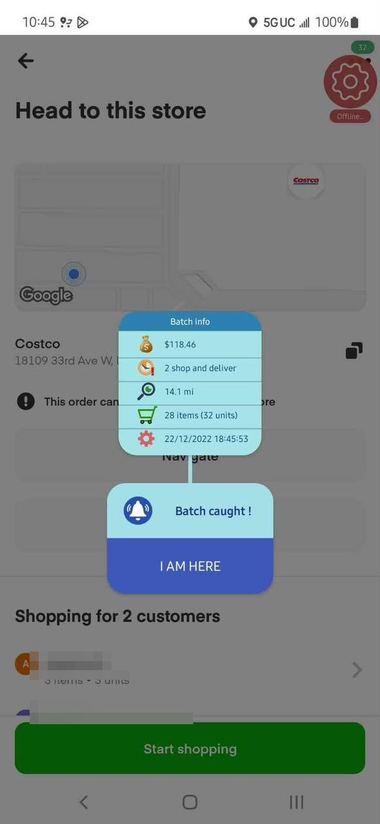
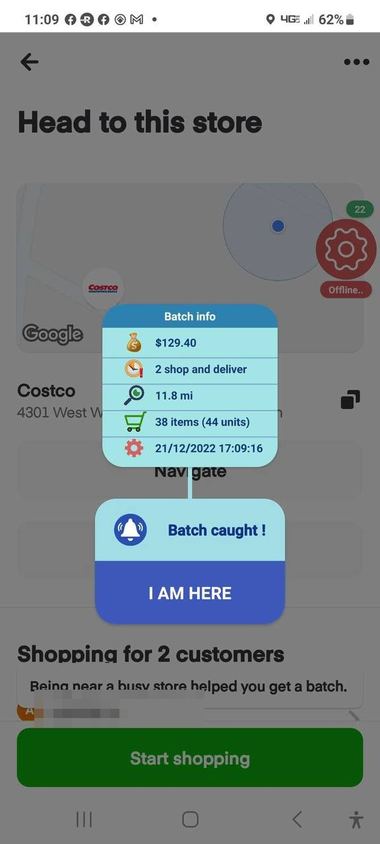
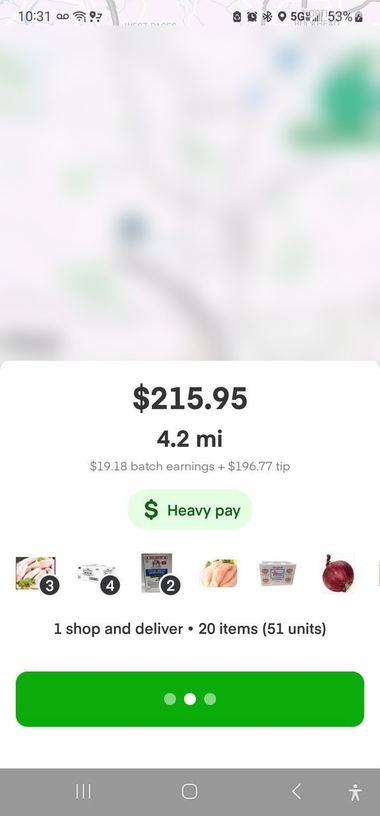
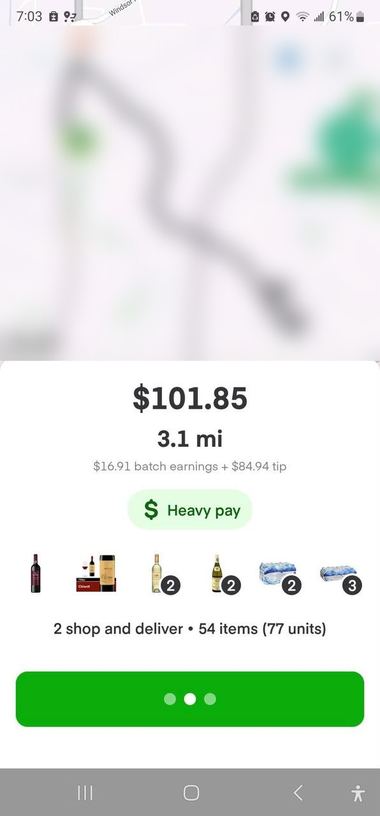
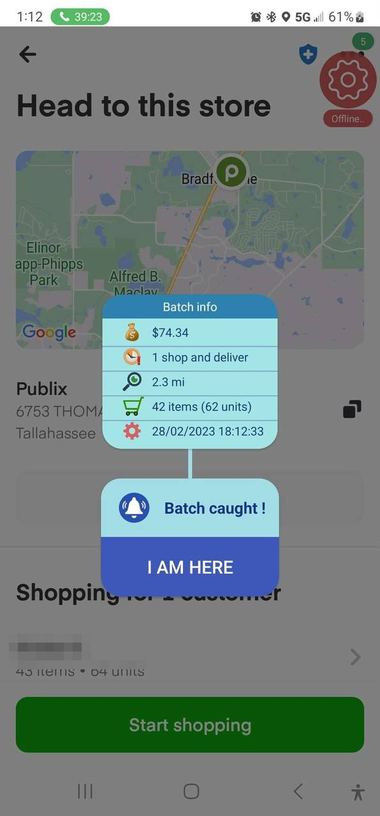
Straight off shoppers’ phones. Customer names and the maps that show where they live are blurred out — those were somebody’s actual delivery.
$74.34
Publix · 2.3 mi · 42 items
$118.46
Costco · 14.1 mi · 28 items
$129.40
Costco · 11.8 mi · 38 items
$215.95
Heavy pay · 4.2 mi · 20 items
$101.85
Heavy pay · 3.1 mi · 54 items
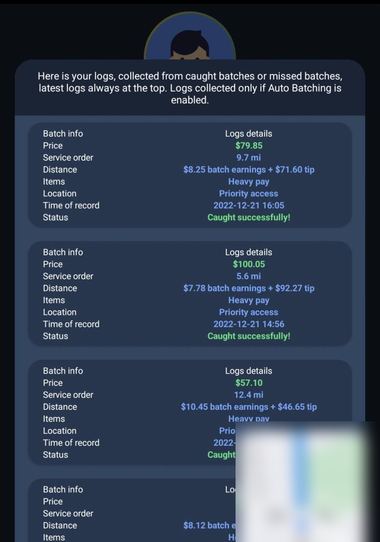
The log
$79.85, $100.05, $57.10 — all caught
These are individual results, not a forecast. What you catch depends on your market, the hours you work and the filters you set — a quiet town at 2pm will not look like this, and we would rather say so than let you find out after installing.
No magic, and nothing hidden: it reads the screen you are already looking at, and taps faster than you can.
While Instacart is open, InstaWizard reads each batch as it appears and accepts the ones matching your rules — no thumb required.
Each set takes a minimum pay and a maximum for orders, miles and items. A batch is taken if it matches any set you have switched on.
Name the stores you will shop, block the ones you won't, and decide whether batches sending you to more than one shop are worth taking.
Tap delay, scroll speed, refresh distance and swipe timing are all adjustable, because a fast phone and a slow one do not behave the same.
Seven things worth knowing, in the order shoppers ask about them. Swipe through.
Auto batching
Your account
Neither would we. So we never ask for it.
No card required
Five batches a week, free. Filters on. No trial clock, no card.
5 / week free
One caught batch has averaged $61 across our customers.
Store filter
Tick a chain for every branch, or one address. Block the one with the impossible parking. Nothing to type — it lists the shops it has already seen on your screen.
Filters
Set pay, distance, items and orders once. Every offer is checked against them.
Why nothing caught
Until now. It tells you which it was, and what the best batch you missed was worth.
“4 batches seen today, none matched. Closest was $64.12 — refused on distance.”
Real customers
Worth more than $1.2M in batch value, and counting.
Screenshots are real catches from InstaWizard customers.
About five minutes from download to catching. You only do it the one time.
Download it here, then open it straight from the download notification. Android will warn you that it did not come from the Play Store — that is expected for anything installed this way.
This is what lets the app read the batch screen and tap Accept. Our picture-by-picture guide walks through it for Samsung and for other Android phones.
Enter the pay, orders, miles and items you will accept, press Start auto batching, then open Instacart and let it work.
Free to try. No credit card.
Five caught batches a week, for as long as you like. Nothing to cancel, because there is nothing to sign up to pay for.
Nothing happened? Tap here for the file directly
Straight from us. Here is exactly what you are installing.
Nothing happened, or it stopped partway? Tap here for the file directly · see the setup guide
Accessibility Service — reads the batch screen and performs the tap that accepts a batch. This is the permission the app cannot work without, and it is the one Android warns you about most loudly.
Display over other apps — the small floating control that lets you start and stop it without leaving Instacart.
Ignore battery optimization — stops Android from quietly killing the service mid-shift.
Notifications — the ongoing notice showing it is running, and alerts when it catches something.
Android will warn you, and that is expected. You will see “This file may be harmful” — tap Open file. Then Play Protect says “App blocked to protect your device” and shows only a Got it button, which cancels: tap More details first to reveal Install anyway. That one catches nearly everybody. The setup guide shows each screen with the button circled — worth opening in another tab before you start.
Two things worth knowing before you install. Android and Google Play Protect will warn about any app that did not come from the Play Store — that appears on the first install and on every update, and the setup guide shows what to tap. And Instacart does not permit automation of its Shopper app — using this may get your Instacart account suspended or deactivated. That risk is yours, and the terms spell it out before you start.
If yours is not here, write to Instawizardbot@protonmail.com — a person answers.
No. InstaWizard needs Android's Accessibility Service to read the screen and tap for you, and iOS has no equivalent. Android 8.0 or newer only.
Play does not accept apps that automate another app on your behalf, so InstaWizard is installed directly from this site. That is why Android shows a warning during installation, and why it appears again on each update.
It is the only way an Android app can read what is on another app's screen and tap a button there. That is exactly what InstaWizard does: it reads each batch as it appears and accepts the ones matching your filters. It is not used for anything else.
It works while the Instacart app is open and on the batch screen. A small floating control lets you stop and start it without digging back into InstaWizard.
Instacart does not permit automation of its Shopper app. Using InstaWizard may get your Instacart account warned, suspended or deactivated, and we cannot promise otherwise or speak for Instacart. That risk is yours to weigh, and our terms say so in the same words.
Five caught batches a week, with the full set of filters — pay, orders, miles and items — and no credit card at any point. Nothing expires and nothing asks you to upgrade.
No. An account is tied to the first phone that signs in. If you replace your phone or factory-reset it, write to Instawizardbot@protonmail.com and we will move the account across.
English, Spanish, French, Portuguese, Hindi, Punjabi and Arabic — every screen, including right-to-left layout for Arabic. Choose yours under Profile.
Usually the Accessibility Service has been switched off by Android, or the app is out of date. Reopen the setup guide to check the switch, and install the latest version from this page. If it still misbehaves, message support from inside the app — or, if you cannot get that far, write to Instawizardbot@protonmail.com — and we will look at your account.
Five batches a week, free. No credit card, nothing to cancel.
Try for free